
Build a Foodbank Voice and WhatsApp Agent with Twilio Agent Connect
During SIGNAL 2026, Twilio announced a set of tools for building contextual conversations powered by AI. Twilio Conversation Orchestrator, Twilio Conversation Memory, and Twilio Conversation Intelligence.
The use cases are endless and this improves customer experiences. However, I thought of a slightly different use case and how this gives dignity to vulnerable people. A foodbank, for example. People call when they are running out of options. If the bot makes them retell their circumstances from scratch every time they call, the experience fails at the moment dignity matters most.
So to show what the new Twilio conversation stack can do, I built a demo. Owl Food Support. Built on Twilio Agent Connect, it works over voice and whatsapp, remembers details in Conversation Memory traits, runs a clear eligibility check, books a real collection slot, and hands cases it can't handle to a human in the loop.
This post walks through building and running it.
What you will build
By the end of this tutorial, you will have an agent that can:
- greet callers naturally, then move into eligibility only after they say what they need
- accept voice calls through Conversation Relay and WhatsApp messages through the same agent loop
- store household details as Twilio Conversation Memory traits, keyed by phone number
- check eligibility against demo serving districts such as
M1toM5, plusM8andM9 - list nearby centres and reserve a 30-minute collection slot
- stream spoken replies and stop cleanly if the caller interrupts
- escalate to a human handoff case when needed
- expose a staff board and a live call view for demos and debugging
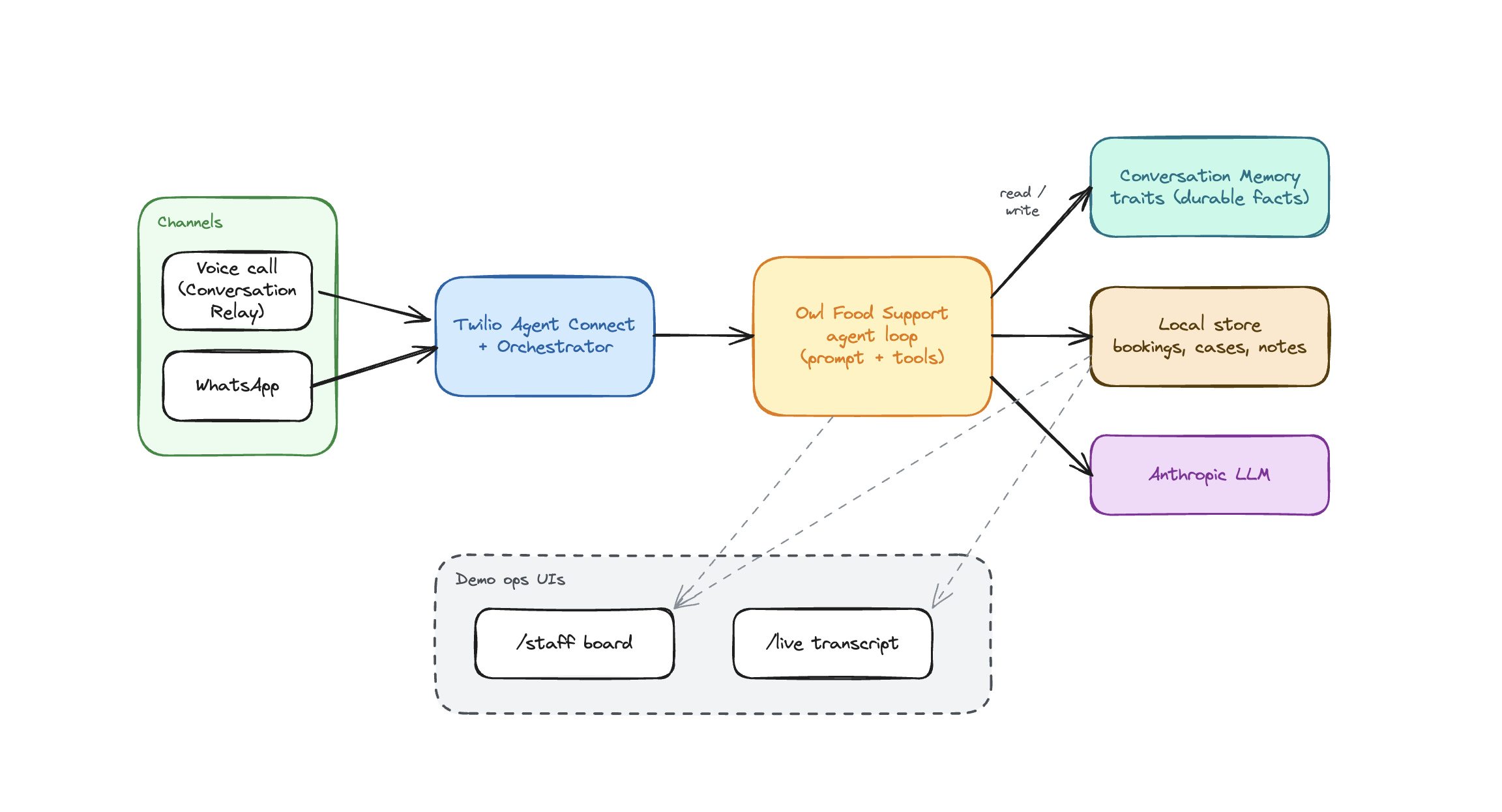
At a high level the path looks like this:
- Someone calls or messages your Twilio number.
- Twilio Agent Connect opens or resumes a conversation with Conversation Orchestrator and Memory attached.
- Your Node server runs the LLM tool loop: update profile, assess eligibility, list centres, book a slot, request human help.
- Durable facts go to Memory traits. Bookings and staff cases stay in a local store for the demo.
- Voice replies stream back through Conversation Relay. WhatsApp replies return as normal messages.
Prerequisites
This walkthrough assumes you are already familiar with Twilio: finding credentials in the Console, buying or configuring a number, and pointing webhooks at a public URL. If that is new to you, start with the Twilio quickstarts first, then come back.
You will also need:
- Node.js 22 or newer
- A Twilio account with a voice-capable phone number
- A WhatsApp sender, or the Twilio WhatsApp Sandbox for testing
- An Anthropic API key
- ngrok or another public HTTPS tunnel
- Comfortable with TypeScript
Helpful docs while you work:
- Twilio Agent Connect
- Conversation Memory
- Conversation Orchestrator
- ConversationRelay TwiML attributes
- Conversation Relay onboarding
Why Agent Connect instead of wiring Conversation Relay by hand
If you have built voice agents the long way, you know the checklist: return TwiML, open a WebSocket, handle prompts, stream tokens, deal with interrupts, map that call to the same person who later messages on WhatsApp.
Twilio Agent Connect collapses a lot of that into a channel model. You register a VoiceChannel and a WhatsAppChannel, add an onMessageReady listener, and return text for messaging or stream tokens for voice. Conversation Orchestrator and Memory plug in through configuration instead of a second custom integration layer.
You still own the interesting parts: the system prompt, the tools and the eligibility rules.
Clone the project and install
Start from the Owl Food Support repo:
git clone https://github.com/charlieoduk/twilio-agent-connect-foodbank-demo.git owl-food-support
cd owl-food-support
npm install
cp .env.sample .env
Open .env and fill in the values as you create them below.
Configure Twilio credentials
In the Twilio Console, create an API Key if you do not already have one. You will need:
- Account SID
- Auth Token
- API Key SID
- API Key secret
- Your voice number in E.164 format
- Your WhatsApp sender in the form
whatsapp:+44...
Put those into .env as TWILIO_ACCOUNT_SID, TWILIO_AUTH_TOKEN, TWILIO_API_KEY, TWILIO_API_SECRET, TWILIO_PHONE_NUMBER, and TWILIO_WHATSAPP_NUMBER.
Also set:
ANTHROPIC_API_KEY=...
FOODBANK_NAME=Owl Food Support
STAFF_USER=staff
STAFF_PASSWORD=choose-a-real-password
STAFF_USER and STAFF_PASSWORD protect /staff and /live with HTTP Basic Auth. Turn that on whenever your tunnel is public.
Accept the AI/ML Features Addendum
TAC uses Conversation Relay for voice, and Conversation Relay will not start until the account has accepted the Predictive and Generative AI/ML Features Addendum.
- In the Console, go to Products & services > Voice > Settings > Privacy & Security.
- Under the predictive and generative AI/ML features addendum, read and accept the terms.
- Click Save.
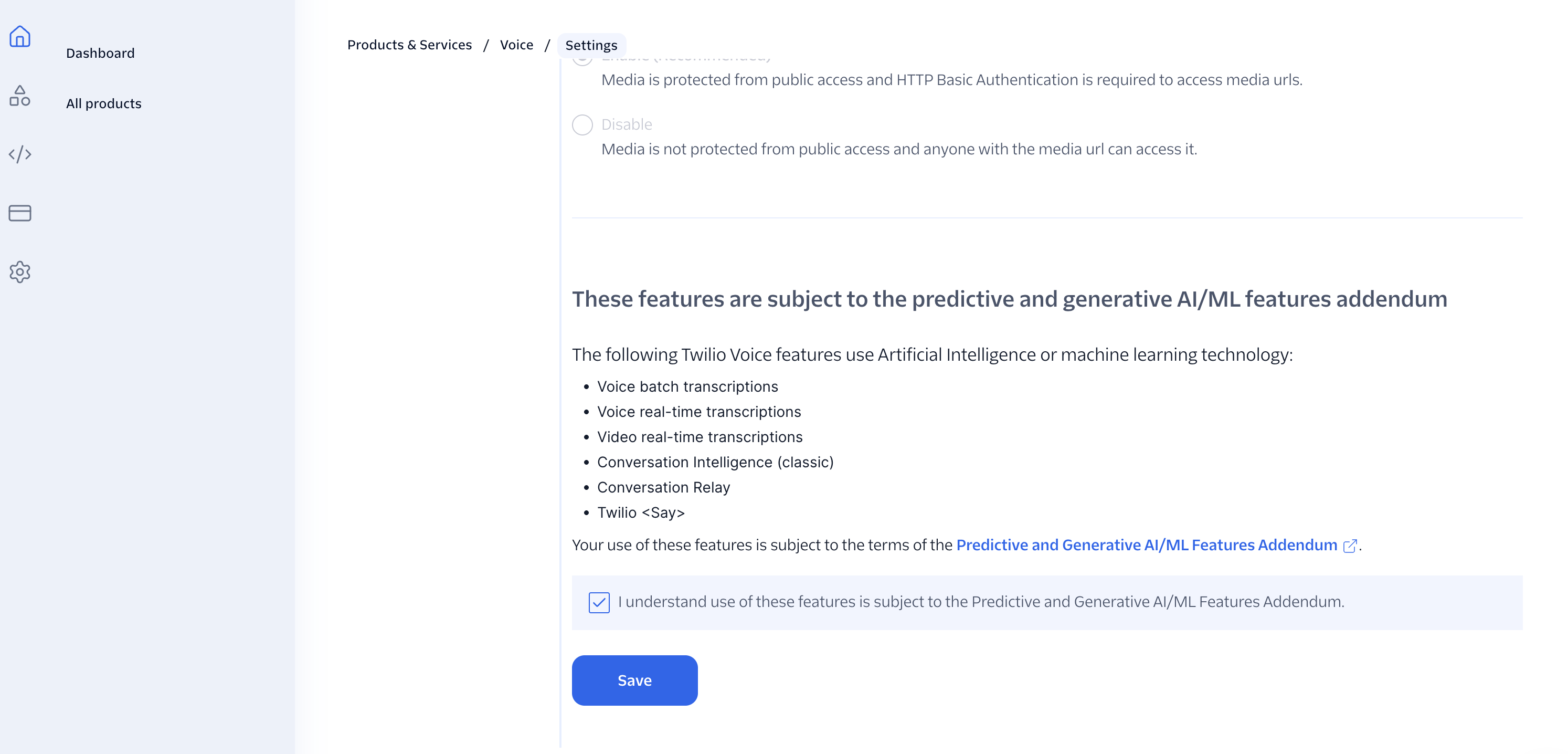
You may also be prompted during Conversation Configuration setup. Accepting it once on the Voice settings page is enough for the account.
Set up Conversation Memory and Orchestrator
You need three Console pieces before the agent can remember anyone across a call and a WhatsApp thread:
- A Memory Store to hold profiles
- Trait groups for the facts this foodbank journey cares about
- A Conversation Configuration that links Orchestrator traffic to that store
You can create the store and configuration through the API or the Console. For this build I used the Console.
Create a Memory Store
- In the Twilio Console, go to Products & services > Conversation Memory > Overview.
- If the account still needs access, upgrade when prompted, then click Get started.
- Twilio creates a Memory Store. Rename it under Settings if you want something clearer for demos, for example
owl-food-support.
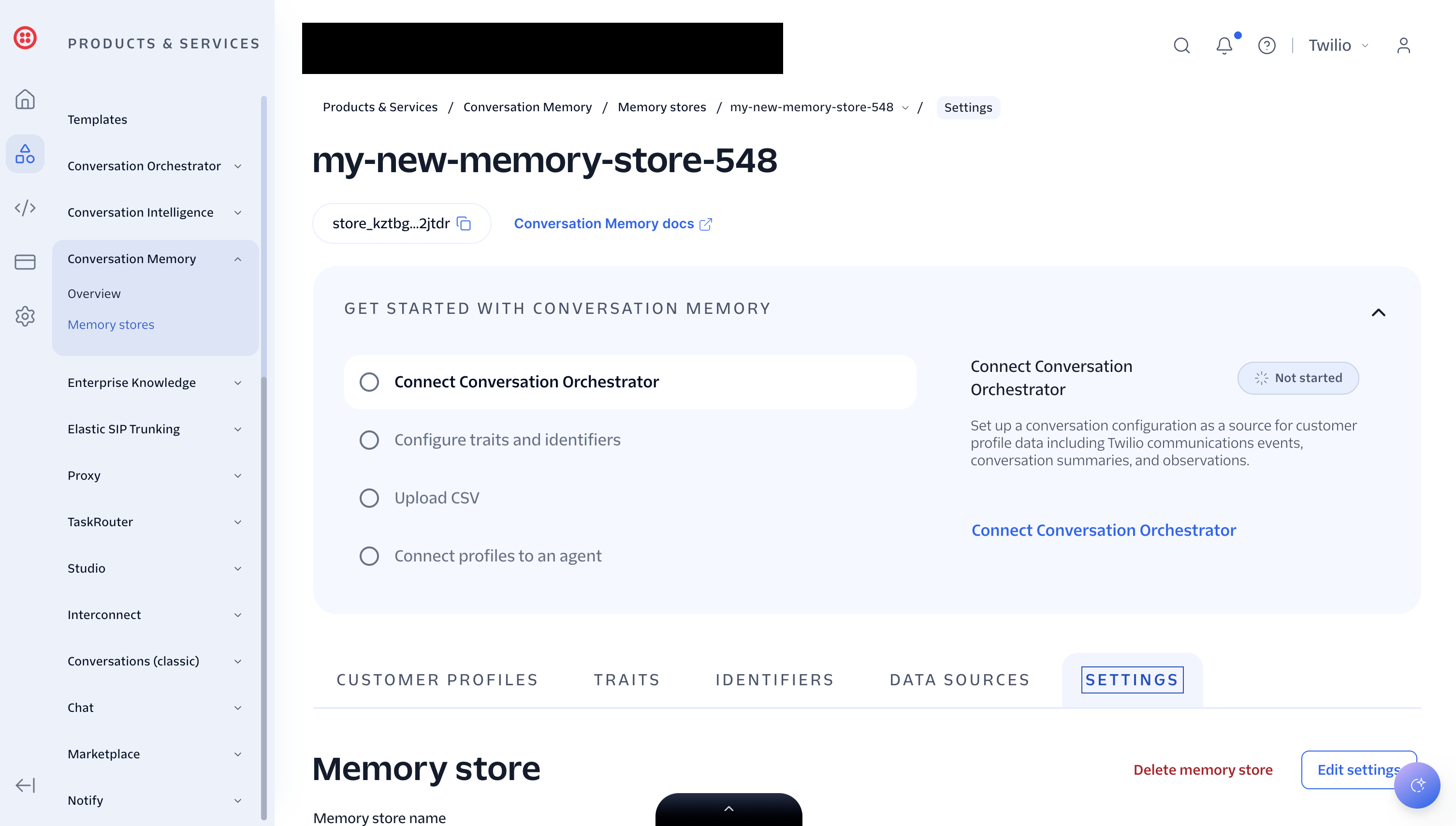
Copy the Memory Store ID (it starts with mem_store_) into .env:
TWILIO_MEMORY_STORE_ID=mem_store_...
Define the trait schema
Traits are structured factual memory: fields on a profile that your agent can read and write.
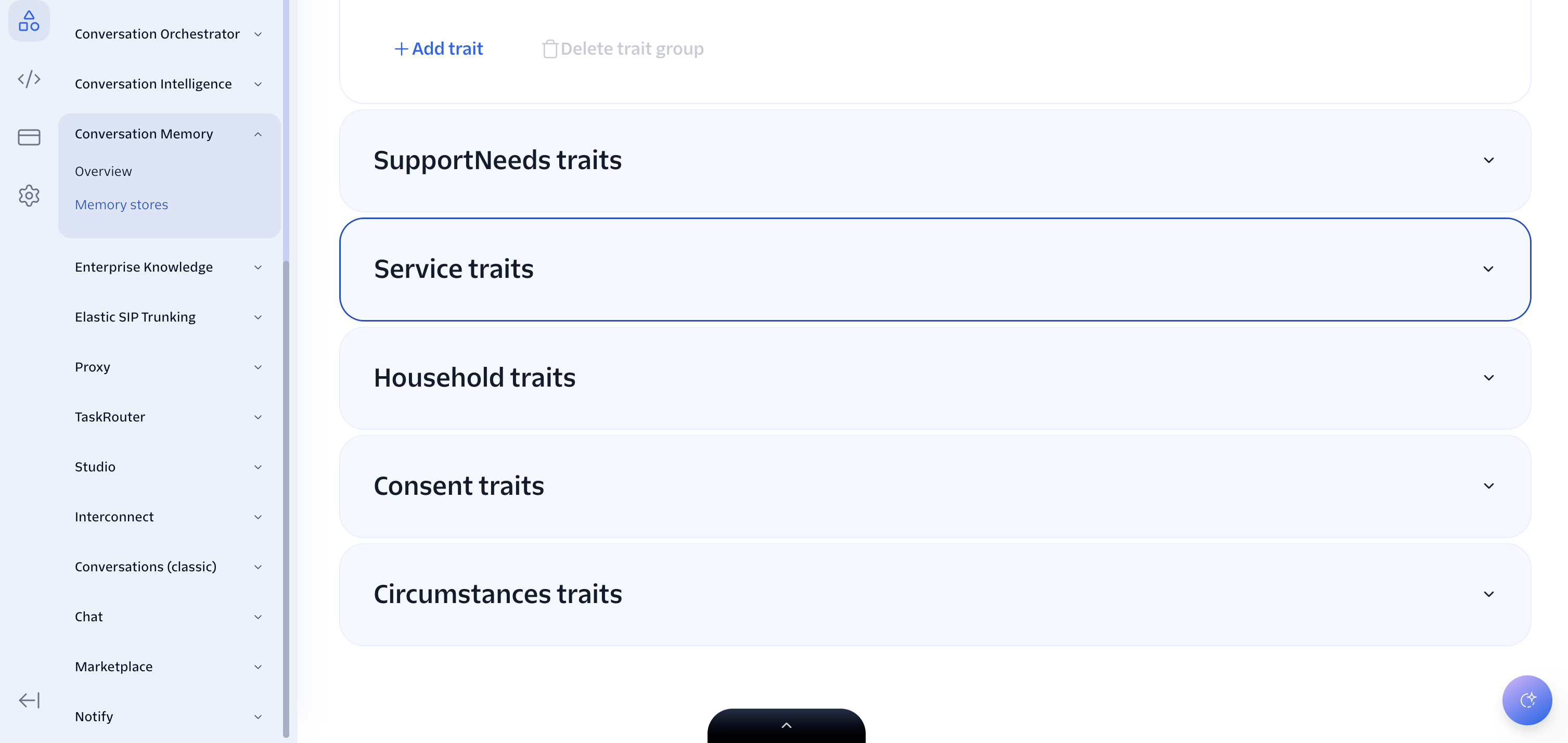
Conversation Memory ships with a default Contact group. Add the rest under Conversation Memory > Settings > Traits:
- Click + Add trait group for each group below that is missing.
- Inside a group, click + Add trait, give it a name, pick a type (
string,number, orboolean), and save.
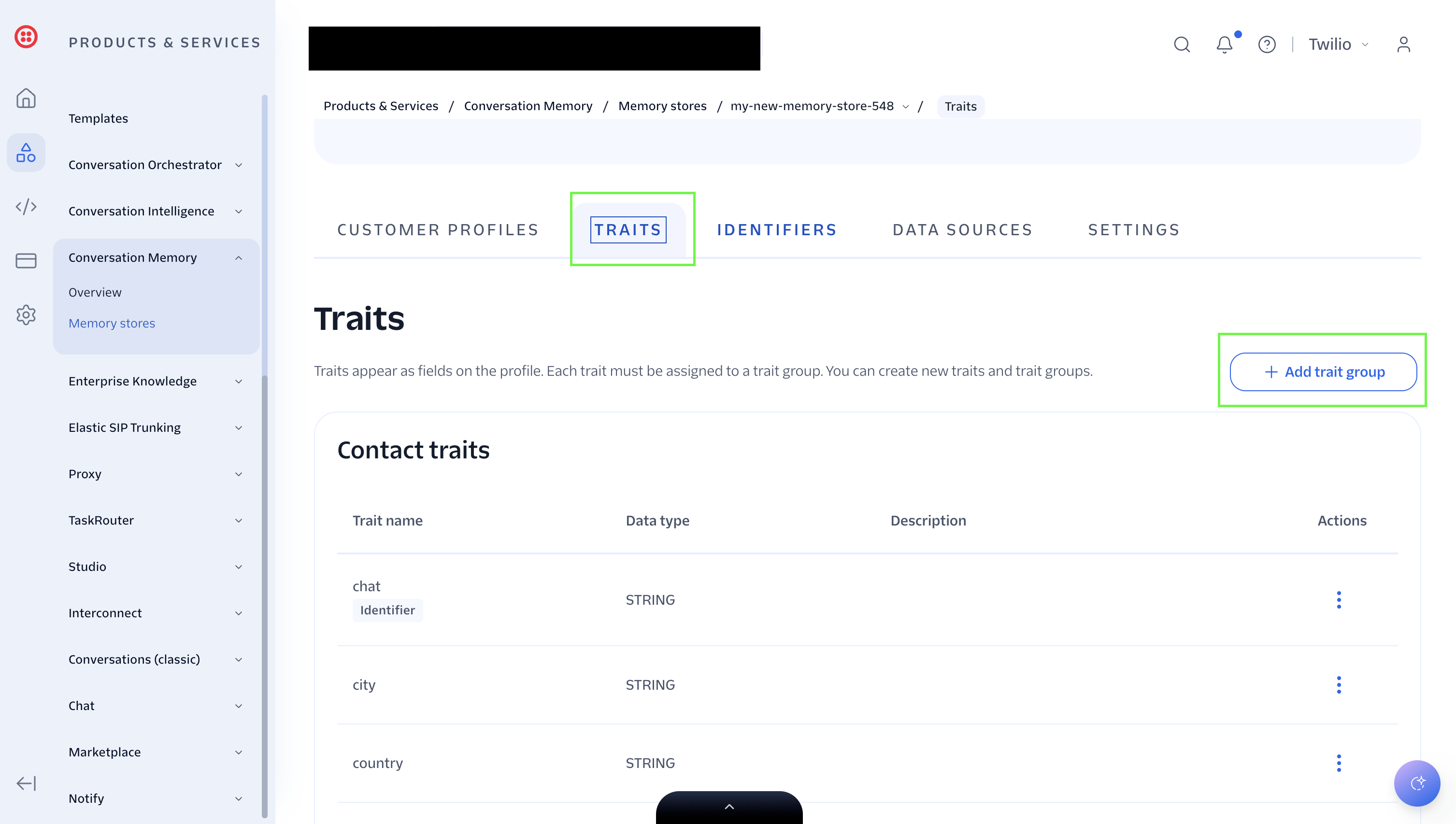
The groups I used:
| Group | Field | Type | Notes |
|---|---|---|---|
Contact | phone | string | Promote to identifier. E.164 phone key. |
Contact | preferredName | string | Optional display name. |
Household | postcode | string | UK postcode, normalised before save. |
Household | householdSize | number | Whole number, 1 or more. |
Circumstances | weeklyIncomeBand | string | One of under_200, 200_to_350, 350_to_500, over_500, prefer_not_to_say. |
Circumstances | onMeansTestedBenefits | boolean | true / false. |
SupportNeeds | dietaryNeeds | string | Free text. |
SupportNeeds | accessNeeds | string | Free text. |
Consent | consentToStoreData | boolean | Soft consent for this support journey. |
Consent | consentCapturedAt | string | ISO timestamp, set when consent is true. |
Service | preferredCentreId | string | Centre id such as riverside. |
Service | lastEligibilityOutcome | string | One of eligible, needs_review, not_in_area, not_eligible_now, incomplete. |
Service | lastAssessedAt | string | ISO timestamp of the last assessment. |
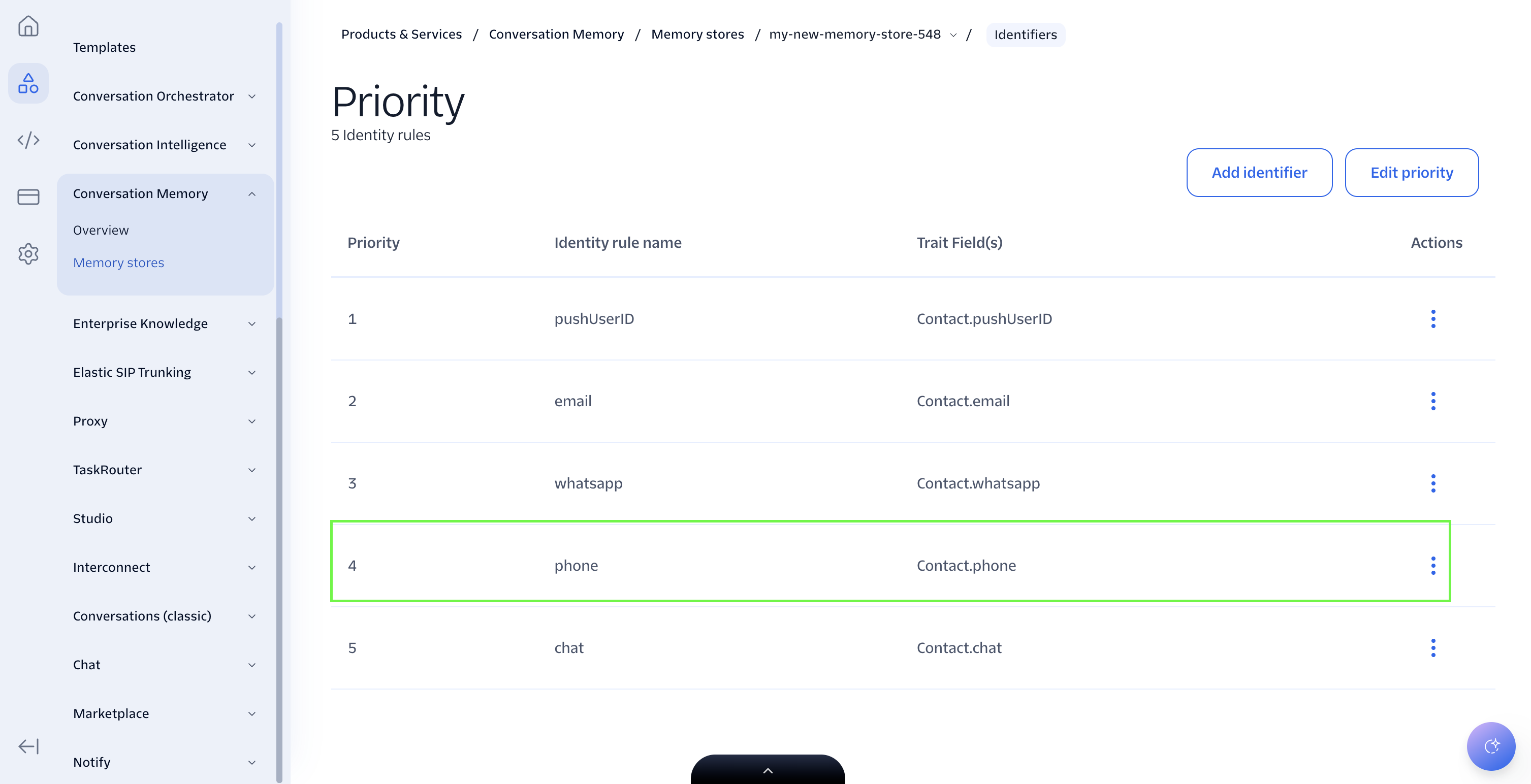
Then check identity resolution under Identifiers. You want a phone rule, with phone normalisation, mapped to Contact.phone. TAC defaults to writing the caller phone into that field, so keep those names unless you also change the env vars below.
TWILIO_MEMORY_PHONE_TRAIT_GROUP=Contact
TWILIO_MEMORY_PHONE_TRAIT_FIELD=phone
TWILIO_MEMORY_PROFILE_TRAIT_GROUPS=Contact,Household,Circumstances,SupportNeeds,Consent,Service
Defining the schema only creates empty slots. The empty slots will be filled at runtime when a user calls or sends a message.
Create a Conversation Configuration
Conversation Orchestrator is what turns calls and WhatsApp messages into conversations Twilio can attach to a profile. Create a configuration that points at the Memory Store you just made:
- Go to Products & services > Conversation Orchestrator > Conversation Configurations.
- Click Create a Conversation configuration.
- Give it a name and description, for example
Owl Food Support. - Select Group by profile.
- For the webhook callback URL, use your tunnel URL with
/webhook, for examplehttps://my-test-tunnel.ngrok-free.dev/webhook. You do not need the agent running yet. Start your tunnel now if you already have a hostname, or paste a placeholder and update this field in the next section once ngrok is up. - Set the HTTP method to POST.
- On the messaging step, include the WhatsApp sender or sandbox number you will use for testing, then click Next.
- On the voice step, enable automatic capture and select your voice-capable Twilio number.
- Accept a basic lifecycle for the demo, with the default closed timeouts.
- On Enable Conversation Memory, select the Memory Store from earlier.
- Finish the wizard and copy the configuration ID. It starts with
conv_configuration_.
Put that ID in .env:
TWILIO_CONVERSATION_CONFIGURATION_ID=conv_configuration_...
How the agent writes traits
When the caller shares a detail, update_profile builds a trait payload and upserts it with createProfile (identity-based upsert for the phone). A simple household write looks like this:
import type { MemoryClient } from "twilio-agent-connect";

async function saveHouseholdPostcode(
  memory: MemoryClient,
  phone: string,
  postcode: string,
) {
  const profileId = await memory.createProfile({
    Contact: {
      phone,
    },
    Household: {
      postcode,
    },
  });

  return profileId;
}
In the agent the payload is built by buildTraitUpsert and called from the foodbank tools, so name, household size, income, consent, and service outcome can land in the same write when needed:
const traits = buildTraitUpsert({
  phone,
  config: traitConfig,
  circumstances: {
    postcode: "M1 3JE",
    householdSize: 2,
    consentToStoreData: true,
  },
});

const profileId = await memory.createProfile(traits);
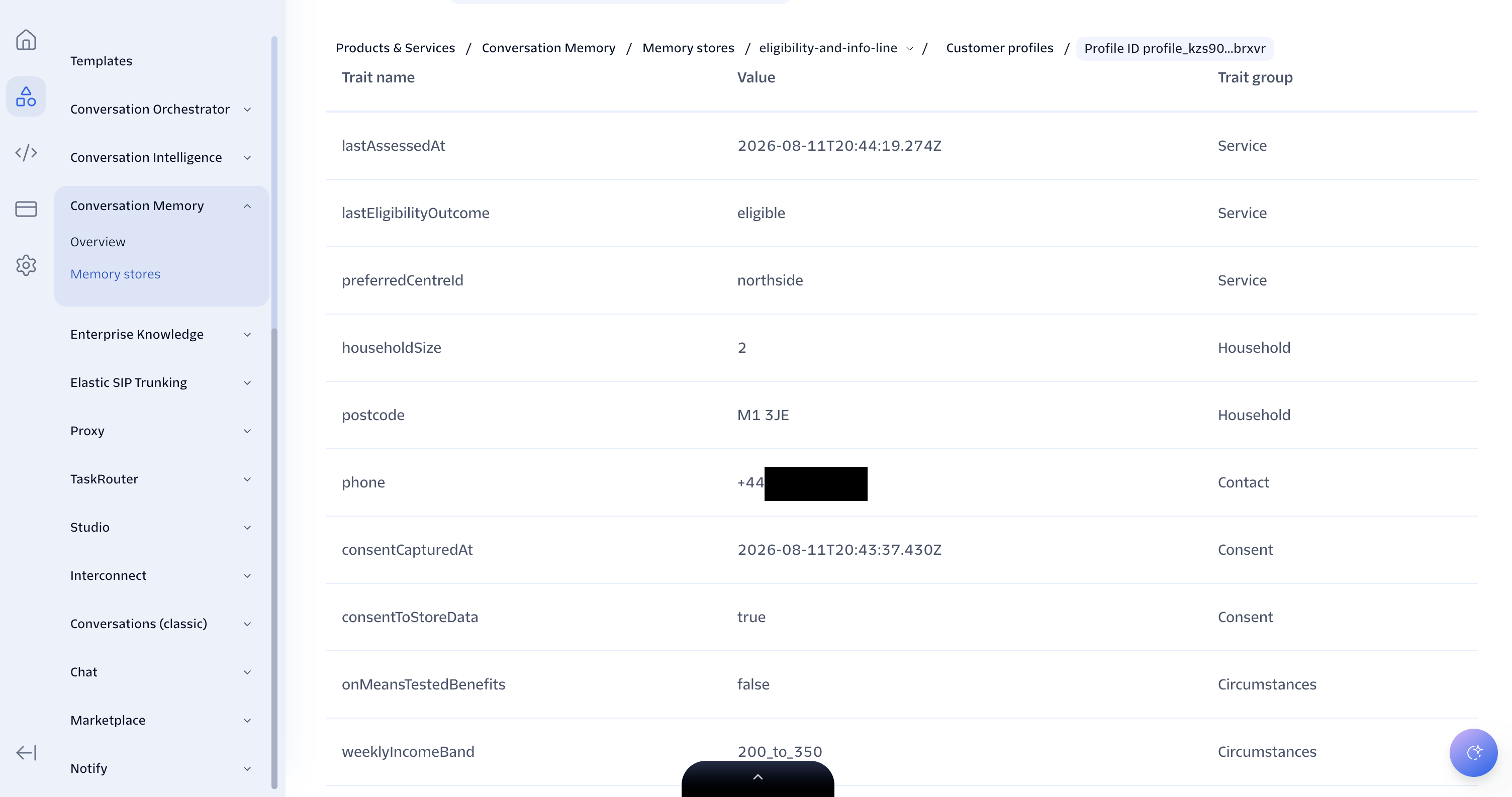
After a successful call or WhatsApp turn, open the Memory profile for that phone in the Console. You should see values under the trait groups rather than empty fields.
Expose the server and point the webhooks
Start a tunnel to local port 8080:
ngrok http 8080
Copy the hostname only, for example abc123.ngrok-free.app, into:
TWILIO_VOICE_PUBLIC_DOMAIN=abc123.ngrok-free.app
In the Twilio Console:
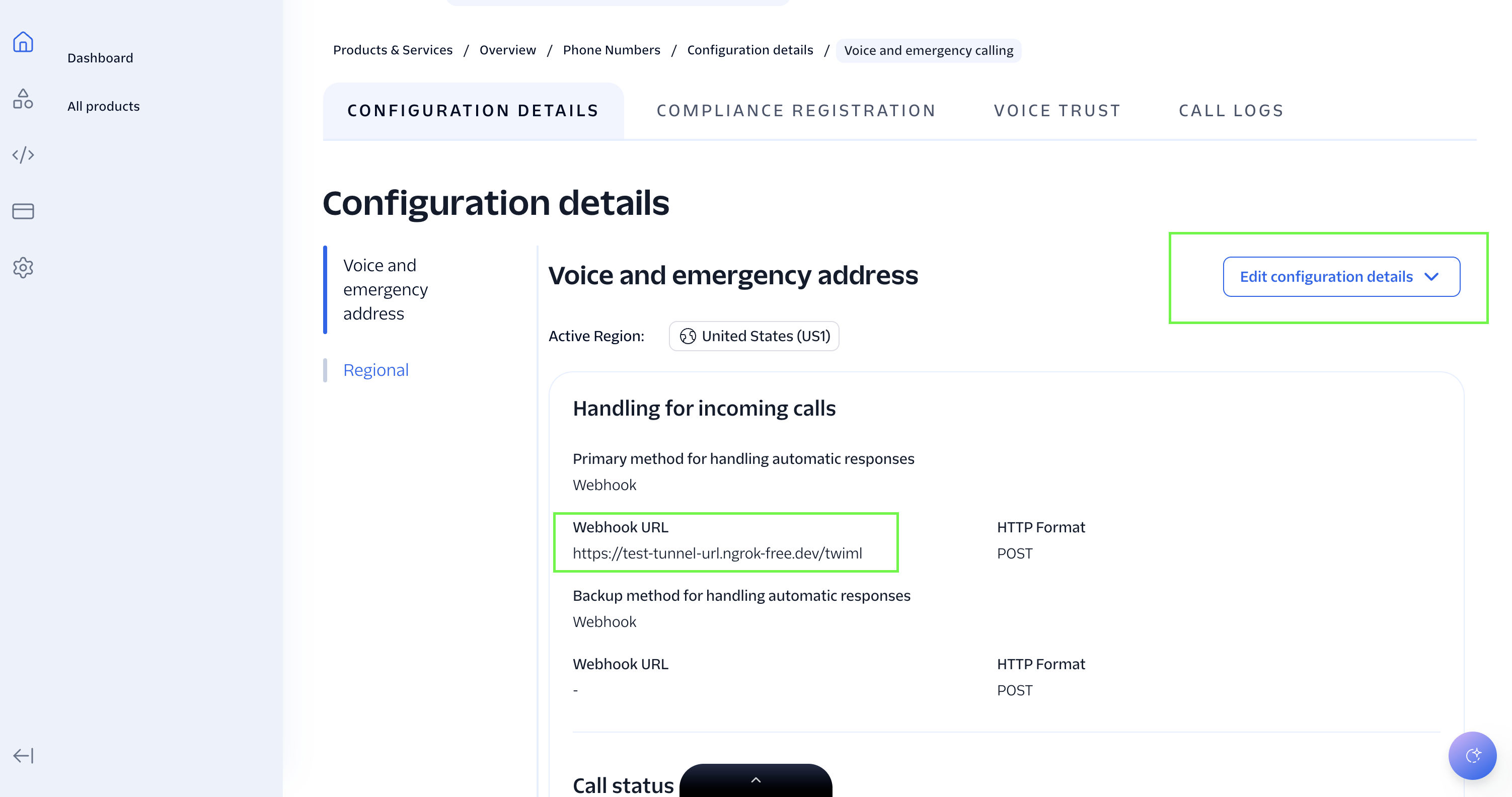
- Open your voice number.
- Set A call comes in to the webhook
https://YOUR_DOMAIN/twiml.
WhatsApp does not need a separate sender webhook. Conversation Orchestrator already routes messaging to the /webhook URL you set on the Conversation Configuration.
If you used a placeholder earlier, update that Orchestrator callback to your real tunnel URL now: https://YOUR_DOMAIN/webhook.
TAC owns those routes through TACServer. You do not need to hand-write the TwiML route.
Run the agent
npm run dev
You should see the staff and live URLs in the logs. Open:
http://localhost:8080/staffhttp://localhost:8080/live
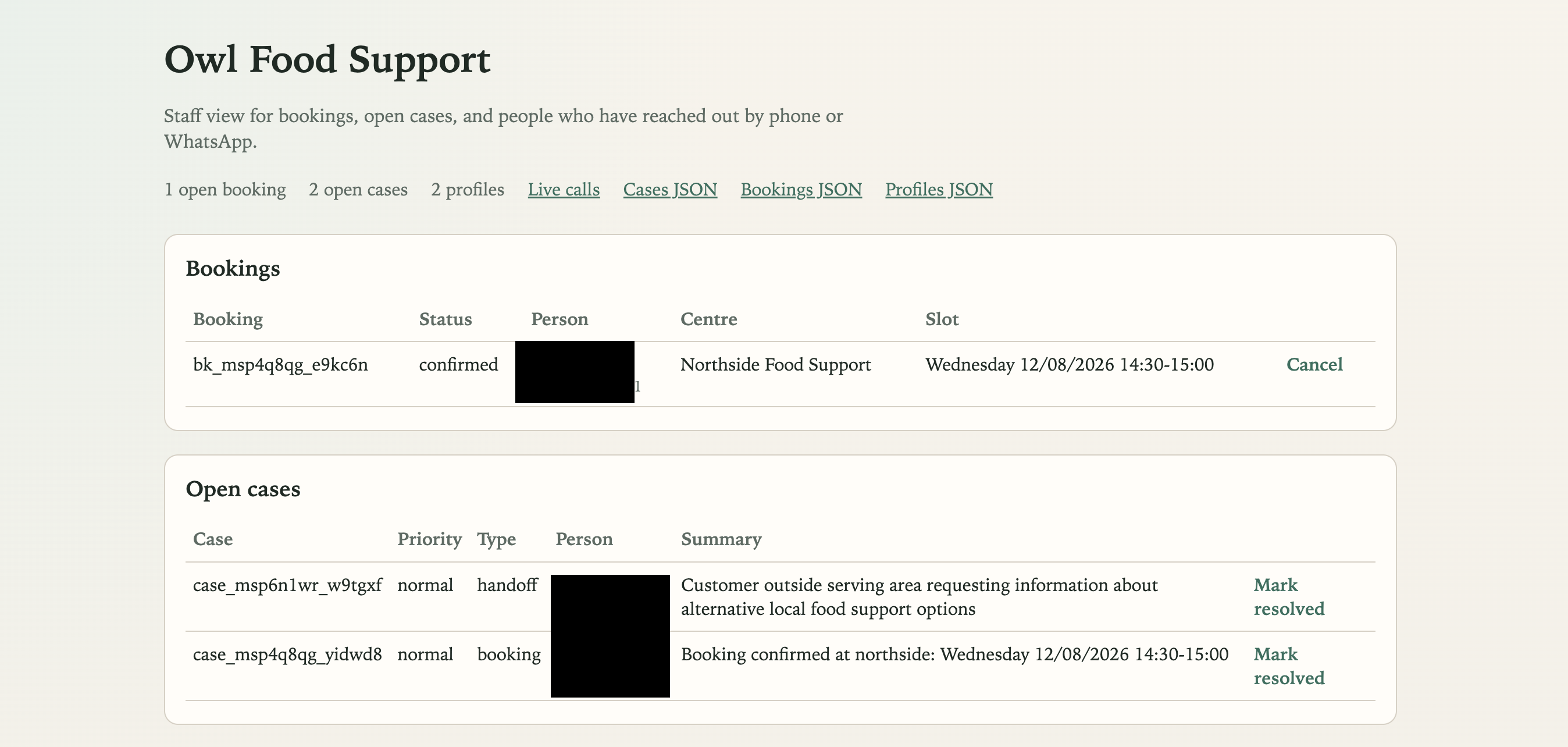
If Basic Auth is configured, the browser will prompt for STAFF_USER and STAFF_PASSWORD.
Run the domain tests while you are here:
npm test
npm run typecheck
The domain tests cover postcode normalisation, eligibility outcomes, slot clashes, and trait mapping. That is deliberate. Agents that behave like customer reference apps should prove the rules they claim.
Walk through the product path
1. Call in and say what you need
The welcome greeting is:
- New caller:
Hello. You've reached Owl Food Support. How can I help you today? - Returning caller with a saved name:
Hello, Charles. How can I help you today?
The agent should not dump an eligibility questionnaire into the first breath. Once the person asks for food support, it can explain that a short eligibility check is the useful next step and ask soft consent to store details for this journey.
2. Complete eligibility
Share a preferred name, a Manchester-area postcode such as M1 3JE, household size, and either benefits or a weekly income band.
If the person is in area and income or benefits support eligibility, the agent can move on to centres. If they are outside the demo districts, it should say so and offer a human handoff.
3. Book a slot
Ask for nearby centres, then ask what times are free. Under the hood the agent uses:
list_centreslist_slotsbook_slot
Slots are generated from each centre's opening hours in 30-minute blocks. A booked slot is reserved in the local store so the next caller cannot take the same time.
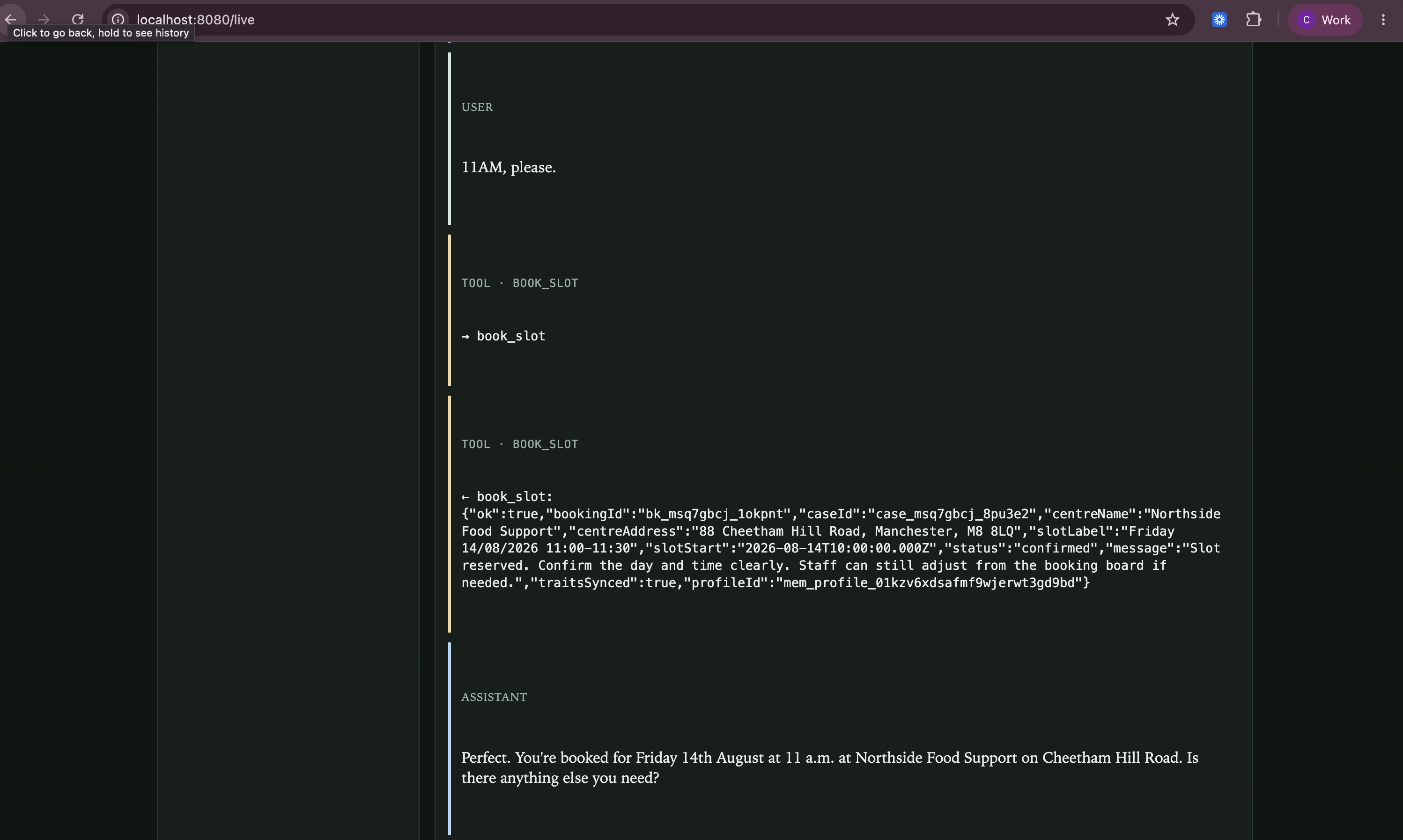
4. Watch the call live
Keep /live open during the call. You should see user turns, assistant replies, tool calls, and interrupts as they happen.
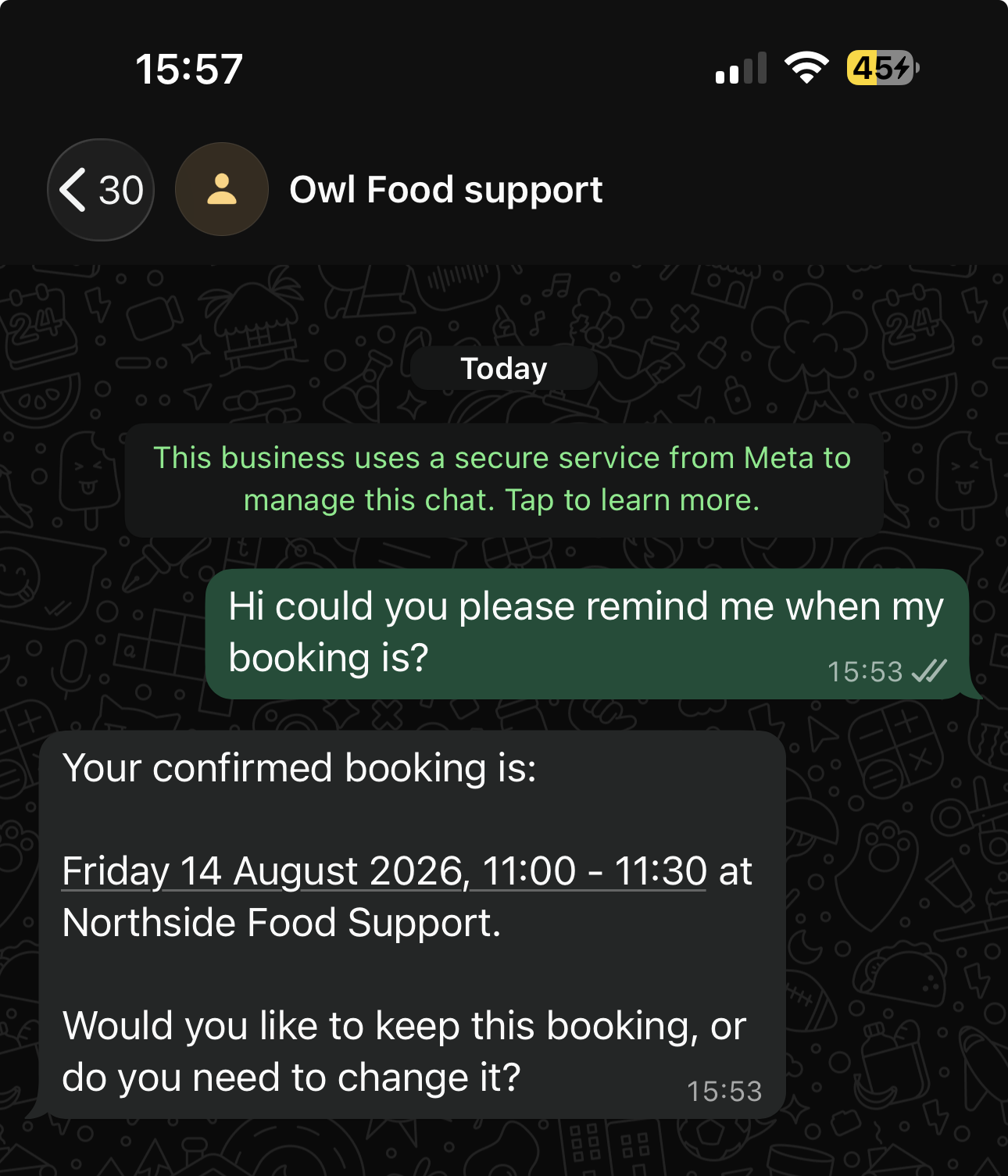
5. Continue on WhatsApp
Message the same number on WhatsApp. Because profile details were written to Memory traits, and the local profile is keyed by phone, the agent should resume without asking for the whole story again.
6. Use the staff board
On /staff you can:
- confirm or cancel bookings
- review open cases
- see saved profiles
If the caller asks for a person, request_human_help creates a handoff case. On voice, the agent also signals a demo live handoff after the bot's final reassurance.
What you built
You built a multi-channel foodbank agent on Twilio Agent Connect, with Memory traits for continuity, Conversation Relay for voice, real slot booking and staff tooling.
If you end up building something like this for a real foodbank or support line, I would like to hear about it.